
Naming and Tagging Conventions
Read this article in Ukrainian ⮕
How to Name Workflows, Messages, Segments, and Contact Fields in eSputnik
Workflows, messages, segments, and contact fields are the core building blocks of your eSputnik account. The more objects you create, the harder they are to navigate without shared naming and tagging rules.
This article is for teams that regularly create workflows, messages, segments, and contact fields in eSputnik and want to keep the account organized. It brings together practical naming and tagging rules that help standardize your main object types, make filtering easier, and prevent mistakes that complicate analytics.
For naming conventions that apply to custom events and their parameters, see Naming Custom Events.
Why It Matters
Standardized names improve analytics. Message names flow through to UTM parameters, which means they appear directly in Google Analytics. A name like AbandonedCart_S01 filters cleanly by campaign and sequence; a name like new email copy creates noise that is hard to untangle months later.
Teams work from the same logic. When everyone uses the same naming structure, there is no guesswork about what a segment covers, which workflow is live, or whether a message is a draft or a production template.
Standardized names and tags reduce mistakes in AI-assisted work. When workflows, segments, fields, and tags follow a clear structure, AI agents can interpret objects more reliably during campaign setup or analysis.
Three Tools for Organizing Objects
eSputnik gives you three ways to describe and organize objects:
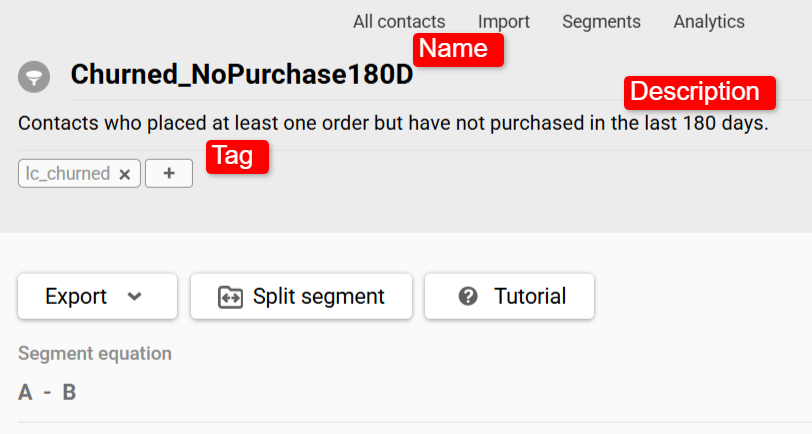
- Name — the main way to understand what an object is at a glance. It appears in lists, reports, and UTM parameters, so it needs to be readable, consistent, and stable.
- Tag — an additional label for filtering and grouping. Use tags for information you filter by often but do not want to encode into every name, such as send type, lifecycle stage, status, or ownership.
- Description — free-form context. Use it for the reasoning behind a segment rule, the hypothesis behind an A/B test, or any detail that would make the name too long.
If a name is getting too long, some of that information probably belongs in a tag or description instead.
Core Principles
General → specific. Fields in a name follow the same order every time, moving from broad context to specific detail. This lets lists naturally group by type and funnel stage.
Controlled vocabulary. Use a fixed, agreed-upon set of abbreviations across your team. For country or market codes, align with ISO 3166 alpha-2 country codes so values like DE, PL, and US stay standardized across systems and reports. Every abbreviation you introduce should be documented in your naming dictionary.
Names describe role, not version. A name should tell you what an object does, not track its edit history. Version markers like _v2, _new, or _copy accumulate over time and tell you nothing useful. If you need to track changes, use the description field. Note: V1/V2 suffixes are a separate convention — they apply only to A/B test variants within a single campaign (see Messages below).
Avoid decoration. Filler words like new, copy, and test, as well as personal markers, make names ambiguous. A name like BF_Nov14_v2_copy will not be readable six months later. Use a structured name and move context to the description.
Include launch dates for broadcast campaigns; use sequence numbers for lifecycle messages. For one-off sends like BF2025_S01, adding a date — BF2025_1114_S01 — helps trace GA traffic back to a specific send months later. For triggered lifecycle messages, the useful dimension is not when the message was sent but where it sits in the series: AbandonedCart_S01, AbandonedCart_S02.
Different objects need different naming density. Workflows and segments benefit from readable, business-language names. Messages need more compact notation because they appear in long lists and should be scannable at a glance. Contact fields also need to work in API calls and personalization templates, so they follow a closer-to-developer convention.
What the Labels in the Patterns Mean
The patterns below use a small set of shared labels:
Stream— the main naming context: a lifecycle stage, campaign type, or message series, such asWelcome,Reactivation,AbandonedCart, orPostPurchase.Goal— the workflow objective, when it needs to be made explicit in the name.Market— the country or market, if the object genuinely differs by market.Seq— the message step number in a series.Role— the message's role in a series, such asReminder,Offer,Urgency, orLastCall.Variant— an A/B test variant.
Workflows
A workflow name should answer: what funnel stage is this, and what is it trying to achieve?
Pattern: [Stream]_[Goal (if needed)]_[Market (optional)]
Put the workflow's main context first, then add the goal if needed, and the market only when it changes the workflow itself.
| Field | What it means | Examples |
|---|---|---|
Stream | Main naming context | Welcome, AbandonedCart, BrowseAbandonment, PostPurchase, Reactivation, Loyalty |
Goal | Clarifies the workflow objective when Stream alone is not specific enough | RecoverCart, UpsellAfterPurchase, WinbackDormant, ActivateVIP |
Market | Add only when the workflow itself differs by market | US, DE, PL |
A note on localization. eSputnik supports multilingual messages natively, so you often do not need separate workflows by language. Add a market suffix only when the workflow itself differs — for example, because of a different offer structure, channel mix, or market-specific legal requirements.
Examples:
| ❌ Bad | ✅ Good |
|---|---|
cart email | AbandonedCart |
reactivation new | Reactivation_WinbackDormant |
after purchase flow copy | PostPurchase_UpsellAfterPurchase |
browse flow 2 | BrowseAbandonment |
vip winback | Loyalty_ActivateVIP_DE |
Some streams are self-explanatory and do not need a Goal suffix — AbandonedCart already implies cart recovery. Add a Goal when the same Stream can serve different purposes: Reactivation_WinbackDormant vs Reactivation_ReturnFromChurn.
Messages
A message name should show which campaign or series it belongs to and its position or role in that series — without opening the message. The channel is already defined by where the message lives in the system. Send type is handled through tags.
For message naming, use one of two approaches.
Sequence-based names
Use this for short series where order is fixed.
Pattern: [Stream]_[Seq]_[Variant (optional)]
Put the series context first, then the step number, and add a variant only when the message is part of an A/B test.
| Field | What it means | Examples |
|---|---|---|
Stream | Main naming context | AbandonedCart, Welcome, PostPurchase, BF2025 |
Seq | Step number in a series | S01, S02, S03 |
Variant | Add only for A/B tests | V1, V2 |
Examples: AbandonedCart_S01, AbandonedCart_S01_V1, BF2025_S01, Welcome_S02
Role-based names
Use this for longer series or when steps may move around over time.
Pattern: [Stream]_[Role]_[Variant (optional)]
Put the series context first and use a short, stable role token instead of a step number.
Examples: AbandonedCart_Reminder, AbandonedCart_Urgency, AbandonedCart_LastCall, AbandonedCart_Reminder_V1
Use one approach consistently within the same series. Do not mix sequence numbers and role-based names in one series.
To distinguish triggered from broadcast messages in filtered views, use type_triggered and type_broadcast tags.
Examples — sequence-based names:
| ❌ Bad | ✅ Good |
|---|---|
cart email 1 | AbandonedCart_S01 |
cart_ab / cart_ab2 | AbandonedCart_S01_V1 / AbandonedCart_S01_V2 |
welcome new | Welcome_S02 |
BlackFriday_final_FINAL | BF2025_S01 |
sms test 3 | Reactivation_S01 |
Examples — role-based names:
| ❌ Bad | ✅ Good |
|---|---|
cart reminder | AbandonedCart_Reminder |
last chance email | AbandonedCart_LastCall |
cart_ab / cart_ab2 | AbandonedCart_Reminder_V1 / AbandonedCart_Reminder_V2 |
post purchase push copy | PostPurchase_Offer |
reactivation last | Reactivation_LastCall |
If you use role-based naming, keep the token set small and stable. Good examples include Reminder, Offer, Urgency, LastCall, and FollowUp. Avoid mixing near-synonyms for the same function, such as Reminder, Nudge, and FollowUp in one series.
If you already use sequence numbers and need to insert a step between S01 and S02, use S01b or plan gaps from the start (S10, S20, S30) so new steps slot in cleanly without breaking historical analytics.
Segments
A segment name should answer: what lifecycle stage are these contacts in, and what is the defining rule?
Pattern: [LifecycleStage]_[SegmentRule]
Put the lifecycle stage first, then the rule that defines the segment.
| Field | What it means | Examples |
|---|---|---|
LifecycleStage | The stage contacts are in | New, Active, AtRisk, Churned, VIP, Prospect |
SegmentRule | The rule that defines the segment | NoPurchase60D, OrderedLast30D, CartAbandoned7D, AOVover200 |
Examples:
| ❌ Bad | ✅ Good |
|---|---|
Active buyers | Active_OrderedLast30D |
at risk NEW | AtRisk_NoPurchase60D |
cart seg 2 | AtRisk_CartAbandoned7D |
Inactive | Churned_NoPurchase180D |
New | New_RegisteredLast7D |
big spenders | VIP_AOVover200 |
Avoid vague lifecycle terms used interchangeably across your account. Define once what each stage means — for example, Active = placed an order in the last 30 days — and apply that definition consistently. Document it in the segment description so it is visible to everyone working in the account.
Contact Fields
Contact fields are used in message personalization, segmentation conditions, and API integrations. A poorly named field causes errors in all three.
Rules:
- Use
camelCase: first word lowercase, subsequent words capitalized. Avoid spaces, underscores, and special characters where possible. - Name the field after the data it holds, not where it came from or how it will be used.
- Be specific enough that the field is unambiguous without documentation.
- Do not store unrelated values in one field.
- Do not create a field for a single temporary campaign. A contact field should represent a stable attribute of the contact, not a campaign state.
| ❌ Bad | Why | ✅ Good |
|---|---|---|
plan | Ambiguous — what kind of plan? | loyaltyTier |
date | Could mean anything | lastPurchaseDate |
last | Requires context to decode | lastOrderId |
cat2 | Version number creates naming debt | preferredCategory |
lang_pref | Inconsistent format | preferredLanguage |
ordersNUM | Ambiguous abbreviation | totalOrdersCount |
TotalRevenue | Uppercase first letter breaks camelCase | totalRevenue |
💡 When several fields belong to the same domain, use a shared prefix. It groups related fields together in the field list and makes segmentation conditions easier to read:
loyaltyTier
loyaltyPoints
loyaltyJoinDate
loyaltyExpiryDate
Using Tags
Tags are additional labels you apply to messages, workflows, segments, and reports. They let you filter and group objects across the account without making names longer.
Contact fields sit outside the tag system — for them, the name is the only organizational tool.
eSputnik has two tag types:
- Communication tags — apply to messages, workflows, and reports.
- Segment tags — apply exclusively to segments.
Both types follow the same naming logic.
What to Put in Tags vs. What to Keep in the Name
| Name contains | Tag contains |
|---|---|
| Workflow / campaign type | Send type (triggered or broadcast) |
| Message step or role | Lifecycle stage for cross-object filtering |
| Market (only if the objects differ by market) | A/B experiment |
| Object status | |
| Owner or team |
Tag Naming Pattern
Follow a category_value format to keep tags scannable:
| Category | Examples |
|---|---|
| Send type | type_triggered, type_broadcast |
| Lifecycle stage | lc_new, lc_active, lc_atrisk, lc_vip |
| A/B experiment | ab_CartSubject, ab_WelcomeOffer |
| Status | status_active, status_draft, status_deprecated |
| Owner / team | owner_anna, team_retention |
Avoid bare tags like active, test, or promo without a category prefix — they become ambiguous as the list grows.
Use owner_ when one specific person is responsible for the object, and team_ when ownership belongs to a team or shared function.
If you need to mark a temporary test object, use status_draft or status_test rather than putting test in the name. Delete temporary objects once testing is complete. If you need to keep something for reference, mark it with status_deprecated.
Marking Deprecated Objects
When a workflow, message, or segment is replaced, add status_deprecated to the old object. This keeps it findable for reference but out of active filtered views when you filter by status_active.
Putting It Together
Here is how the conventions work across one workflow and the related objects around it:
| Object | Name | Tags |
|---|---|---|
| Workflow | AbandonedCart | lc_atrisk, team_retention |
| Message 1 | AbandonedCart_S01 | type_triggered, status_active |
| Message 2 | AbandonedCart_S02 | type_triggered, status_active |
| A/B variant | AbandonedCart_S02_V1 / AbandonedCart_S02_V2 | ab_CartSubject |
| Segment | AtRisk_CartAbandoned7D | lc_atrisk |
| Contact field | lastPurchaseDate | — |
Each name shows what the object is and where it fits. Tags handle filtering by team, tracking experiments, and marking status.
Common Mistakes
| Mistake | Why it is a problem | Better approach |
|---|---|---|
welcome_new, cart_final, email_copy | Temporary words stop meaning anything after a short time | Use a pattern such as Welcome_S01, AbandonedCart_S01 |
Active, Inactive, Leads | Vague labels with no rule behind them | Active_OrderedLast30D, Churned_NoPurchase180D |
| The same lifecycle term used with different meanings | Active in one segment = purchased recently, in another = opened an email | Document the definition in the segment description |
| A contact field created for one campaign | Pollutes the field list and breaks structure | A field should represent a stable contact attribute; campaign state belongs in tags or events |
Status in the name: AbandonedCart_old, Welcome_deprecated | The name stops being stable | Put status into a tag such as status_deprecated |
Tags without a category prefix: active, test, promo | They become ambiguous and unreliable in filtering | status_active, status_test, lc_active |
How to Implement the Rules
If you are starting from scratch:
- Agree on the naming language across the team. Latin characters are usually the safest choice.
- Define your lifecycle stages for segments: what
Active,AtRisk, andChurnedmean in your account. - Assign an owner for the rules, such as Marketing Ops or a CRM lead.
- Start naming new objects with these patterns from day one.
If the account already contains objects:
- Do not rename everything at once — that can break analytics and usually never gets finished.
- Start with new objects and create them using the new rules.
- Rename existing objects gradually when you edit or review them as part of regular work.
- Mark outdated objects with
status_deprecatedinstead of deleting them immediately.
How to Verify the Result
After rollout, check the actual object lists in the interface: workflow lists, message lists inside the relevant channels, the segment list, contact field settings, and filtered views that rely on tags. As you review those areas, make sure that:
- workflow names follow the
Stream[_Goal][_Market]pattern; - message names use one approach consistently within a series;
- segment names follow
LifecycleStage_SegmentRule; - contact fields use descriptive
camelCasenames; - send type is handled through
type_triggered/type_broadcasttags; - deprecated objects use
status_deprecated; - abbreviations and tag categories match your naming dictionary.
Naming Quick Reference
| Object | Pattern | Example |
|---|---|---|
| Workflow | Stream[_Goal][_Market] | PostPurchase_UpsellAfterPurchase_DE |
| Message | Stream_Seq[_Variant] or Stream_Role[_Variant] | AbandonedCart_S01, AbandonedCart_Reminder_V1 |
| Segment | LifecycleStage_SegmentRule | AtRisk_NoPurchase60D |
| Contact field | Descriptive camelCase name | lastPurchaseDate, loyaltyTier |
Tag Quick Reference
| Category | Format | Examples |
|---|---|---|
| Send type | type_value | type_triggered, type_broadcast |
| Lifecycle stage | lc_value | lc_new, lc_active, lc_vip |
| A/B experiment | ab_value | ab_CartSubject, ab_WelcomeOffer |
| Status | status_value | status_active, status_draft, status_deprecated |
| Owner / team | owner_value, team_value | owner_anna, team_retention |
Maintaining the Rules
- Assign an owner. One or two people should review new objects and watch for consistency.
- Keep a naming dictionary. Document all approved abbreviations, lifecycle stage definitions, allowed
Streamvalues, and tag categories in a shared team document. - Fix as you go. If you edit an old object that does not follow the rules, rename it as part of the same task.
- Do not delete outdated objects immediately. Mark them with
status_deprecatedso they remain available for reference.
Related Articles
Updated 5 months ago