
Setting Up SDK
Follow this guide to integrate eSputnik into an Expo app.
Step 1: Install package
Using yarn:
yarn add expo-reteno-sdkor npm:
npm i expo-reteno-sdkStep 2: Configure plugin in app.json
app.jsonChoose one initialization path.
Path A: Automatic initialization
Set ios.sdkAccessToken to initialize automatically with default options:
{
  "expo": {
    "plugins": [
      [
        "expo-reteno-sdk",
        {
          "ios": {
            "sdkAccessToken": "YOUR_SDK_ACCESS_KEY",
            "mode": "production",
            "notificationService": "apns",
            "devTeam": "XXXXXXXXXX",
            "appGroups": ["group.com.your.bundleid.reteno-local-storage"],
            "config": {
              "isDebugMode": false
            }
          }
        }
      ]
    ]
  }
}
If
sdkAccessTokenis set, a laterReteno.initialize()call is a no-op. Use Path B when you need runtime initialization options.
Path B: JavaScript-controlled initialization
Omit ios.sdkAccessToken from the plugin config:
{
  "expo": {
    "plugins": [
      [
        "expo-reteno-sdk",
        {
          "ios": {
            "mode": "production",
            "notificationService": "apns",
            "devTeam": "XXXXXXXXXX",
            "appGroups": ["group.com.your.bundleid.reteno-local-storage"]
          }
        }
      ]
    ]
  }
}
Then initialize Reteno once at app startup:
import Reteno from 'expo-reteno-sdk';

await Reteno.initialize({
  apiKey: 'YOUR_SDK_ACCESS_KEY',
  isDebugMode: false,
  lifecycleTrackingOptions: 'ALL',
  sessionDurationSeconds: 30,
  pauseInAppMessages: false,
  iosDeviceTokenHandlingMode: 'automatic',
});
Step 3: Run Expo prebuild and install pods
npx expo prebuild --platform ios
npx pod-install
The plugin configures early Reteno delegate registration, Notification Service Extension target, entitlements, and App Groups. With Path A, it also adds the SDK access key to Info.plist.
It also creates Notification Content Extension (NotificationContentExtension) for rich push UI (carousel/content rendering).
The plugin is idempotent: running expo prebuild again without --clean reuses the existing NotificationServiceExtension and NotificationContentExtension targets and does not append duplicate target blocks to the Podfile. If an older plugin version already created duplicate blocks, remove the extra copies once before running prebuild again.
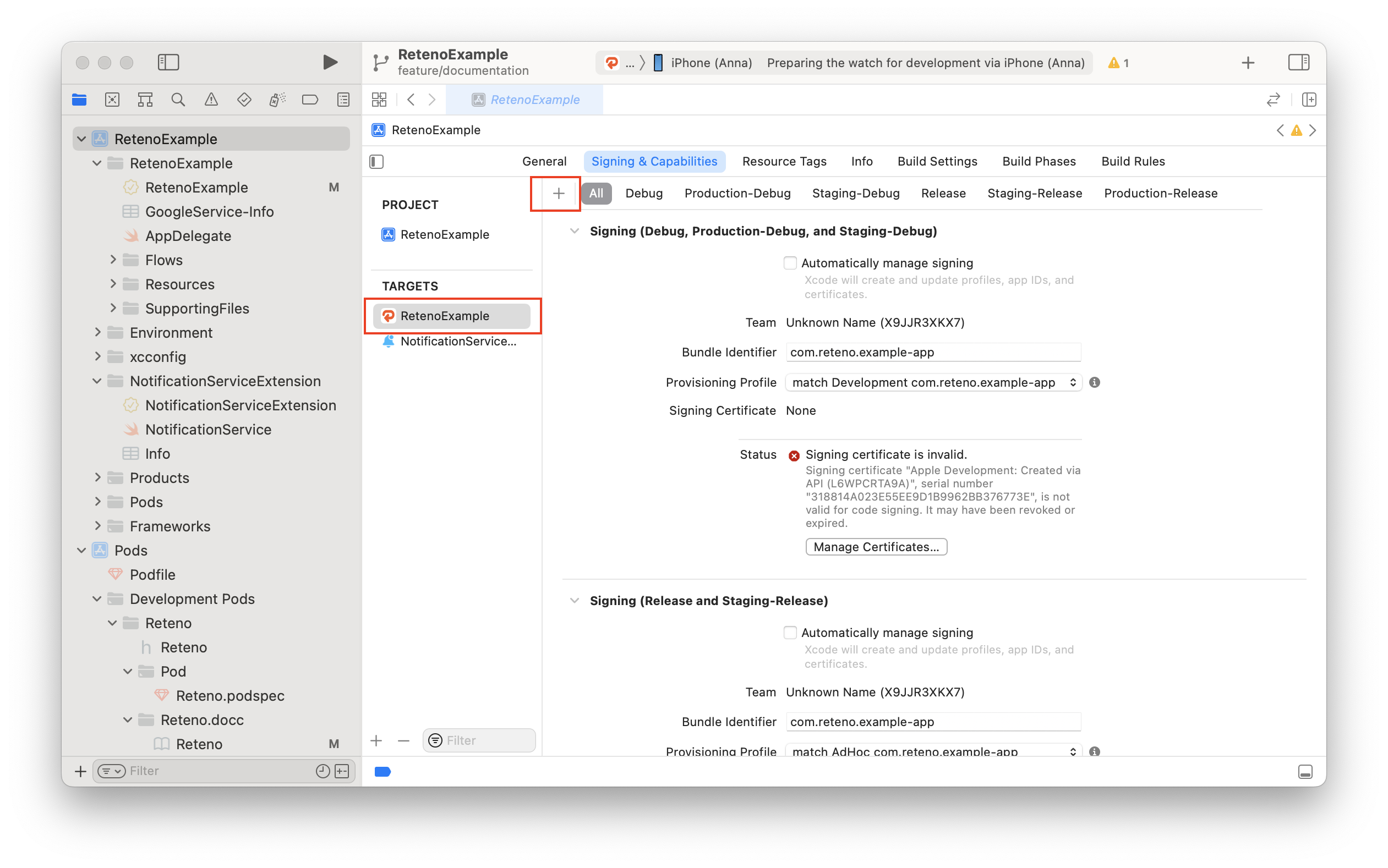
Step 4: Open Xcode project and verify capabilities
Open ios/<YourApp>.xcworkspace in Xcode.
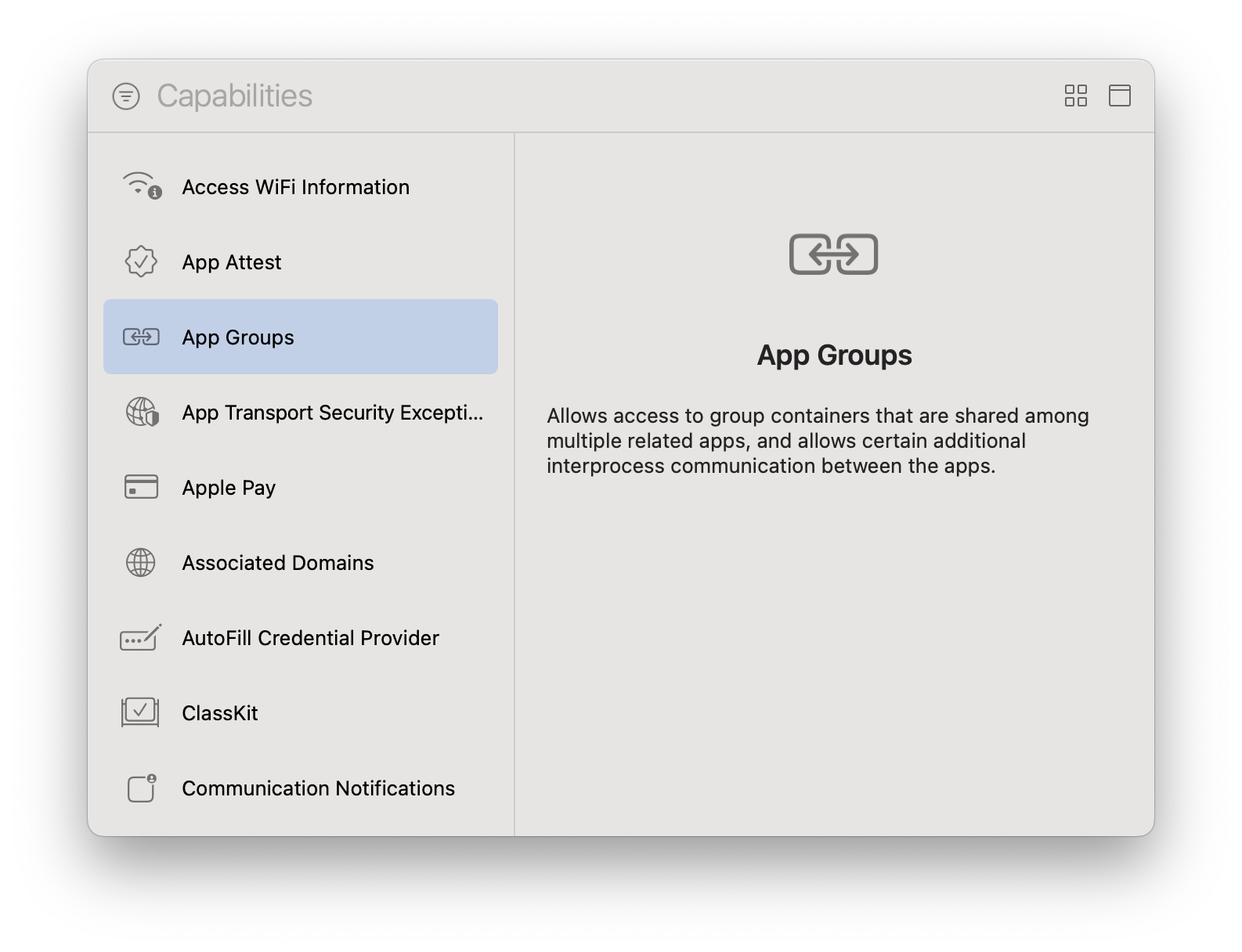
For your main app target:
- Go to
Signing & Capabilities - Add
Push Notifications - Ensure
App Groupscapability is enabled
Step 5: Development build required
Run iOS app with native build:
npx expo run:iosexpo-reteno-sdk is not supported in Expo Go.
EAS Build (important for iOS extensions)
If you build with EAS Build (managed credentials), define iOS app extensions in Expo config.
Without this block, extension signing/provisioning may fail in cloud build.
Add to app.json / app.config:
{
  "expo": {
    "extra": {
      "eas": {
        "build": {
          "experimental": {
            "ios": {
              "appExtensions": [
                {
                  "targetName": "NotificationServiceExtension",
                  "bundleIdentifier": "com.your.bundle.NotificationServiceExtension",
                  "entitlements": {
                    "com.apple.security.application-groups": [
                      "group.com.your.bundle.reteno-local-storage"
                    ]
                  }
                },
                {
                  "targetName": "NotificationContentExtension",
                  "bundleIdentifier": "com.your.bundle.NotificationContentExtension",
                  "entitlements": {
                    "com.apple.security.application-groups": [
                      "group.com.your.bundle.reteno-local-storage"
                    ]
                  }
                }
              ]
            }
          }
        }
      }
    }
  }
}
Replace com.your.bundle with your real iOS bundle identifier.
References:
Optional: Firebase on iOS
If you use FCM on iOS:
- set
notificationServiceto"firebase" - add
GoogleService-Info.plistto your iOS project target - pass FCM token to eSputnik with
Reteno.setDeviceToken(token)
Plugin Props
| Prop | Type | Required | Description |
|---|---|---|---|
sdkAccessToken | string | No | SDK access key for automatic initialization. Omit it to initialize from JavaScript. |
mode | "development" | "production" | Yes | APS environment. Use "development" for debug/simulator builds, "production" for App Store/TestFlight |
notificationService | "apns" | "firebase" | Yes | Push delivery provider |
devTeam | string | No | Apple Development Team ID (10-character string from Apple Developer portal) |
appGroups | string[] | Yes | App Group identifiers (e.g. ["group.com.your.bundleid.reteno-local-storage"]) |
config | object | Yes | SDK initialization config (see config object below) |
deploymentTarget | string | No | iOS deployment target for Notification Service Extension. Default: "15.1" |
nseFilepath | string | No | Path to a custom NotificationService.swift file |
config.isDebugMode | boolean | No | Enable SDK debug logging. Only applies when sdkAccessToken is set (Path A). Writes RetenoIsDebugMode to Info.plist. |
Firebase Integration
If you use Firebase Cloud Messaging instead of APNs directly:
1. Install Firebase package
yarn add @react-native-firebase/app @react-native-firebase/messaging2. Set notificationService to "firebase" in app.json
notificationService to "firebase" in app.json{
"ios": {
"mode": "production",
"notificationService": "firebase",
"devTeam": "XXXXXXXXXX",
"appGroups": ["group.com.your.bundleid.reteno-local-storage"]
}
}3. Run prebuild and pod install
npx expo prebuild --platform ios
npx pod-install
The plugin automatically adds Firebase modular headers to your Podfile and configures MessagingDelegate in AppDelegate.swift.
4. Add GoogleService-Info.plist to Xcode
GoogleService-Info.plist to XcodeDownload GoogleService-Info.plist from your Firebase Console and add it to your main app target in Xcode.
5. Pass the FCM token to eSputnik
import { useEffect } from 'react';
import messaging from '@react-native-firebase/messaging';
import Reteno from 'expo-reteno-sdk';
import { Platform } from 'react-native';

await Reteno.initialize({
  apiKey: 'YOUR_SDK_ACCESS_KEY',
  iosDeviceTokenHandlingMode: 'manual',
});

useEffect(() => {
  if (Platform.OS !== 'ios') return;

  messaging().getToken().then((token) => {
    Reteno.setDeviceToken(token);
  });

  return messaging().onTokenRefresh((token) => {
    Reteno.setDeviceToken(token);
  });
}, []);
Auto-open links
Auto-open link behavior is controlled from JavaScript with Reteno.setAutoOpenLinks(). No additional AppDelegate.swift setup is required in v2.0.0.
See the Push notification guide for the JS-side setAutoOpenLinks / getAutoOpenLinks API.
Important
modeis required (developmentfor debug/simulator,productionfor TestFlight/App Store).appGroupsis required for proper Reteno storage between app and extension.