
Configuring Action Buttons
When creating mobile push notifications, you can add action buttons.
- iOS supports up to 4 buttons in one notification.
- Android supports up to 3 buttons in one notification.
Adding Action Buttons
- In eSputnik, open
Messages -> Mobile Push. - Create a push or edit existing one.
- Configure the
Buttonssection.
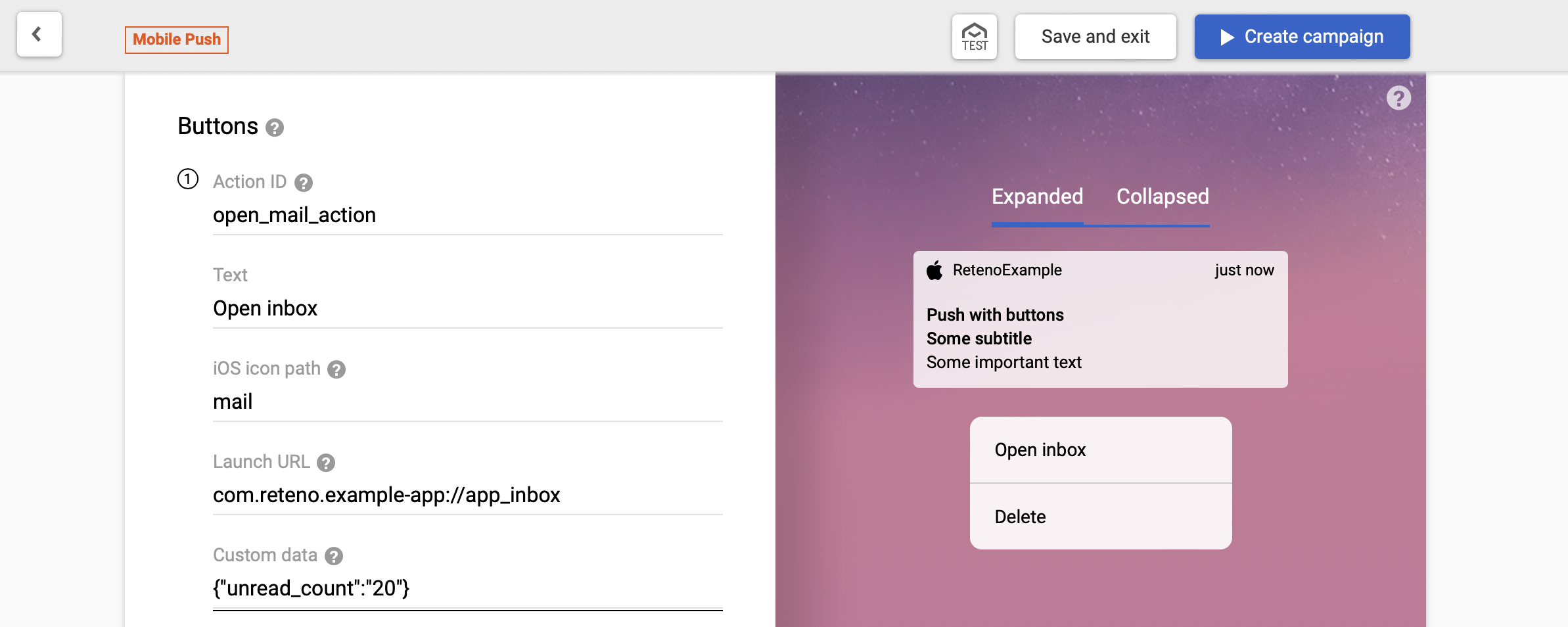
Use unique Action ID values for different buttons.
| Parameter | Notes |
|---|---|
| Action ID | Unique button action identifier |
| Text | Text shown on the button |
| iOS icon path | Available on iOS 15+. Name of image from app bundle |
| Launch URL | URL/deeplink to open |
| Custom data | Additional JSON payload |
Handle Action Button click
Enable handler for iOS event emission:
await RetenoPlugin.setNotificationActionHandler({ emitEvent: true });Subscribe:
function onPushButtonClicked(event) {
  const detail = event && event.detail !== undefined ? event.detail : event;
  console.log('reteno-push-button-clicked:', detail);
  // detail.actionId
  // detail.link
  // detail.customData
  // detail.userInfo
}

RetenoPlugin.setOnRetenoPushButtonClickedListener(onPushButtonClicked);

// later
RetenoPlugin.removeOnRetenoPushButtonClickedListener(onPushButtonClicked);
Disable handler:
await RetenoPlugin.setNotificationActionHandler(false);Android note: setNotificationActionHandler(...) is no-op on Android. Action button clicks are detected automatically.