
Installation
Requirement:
cordova-android >= 12.0.0. Older Cordova Android platforms will refuse to install the plugin.
- Install plugin from the project root:
cordova plugin add cordova-plugin-reteno --variable RETENO_ACCESS_KEY=YOUR_KEYConfigure via config.xml (Cordova)
If you prefer to keep the access key in your Cordova app config (instead of passing --variable during installation), configure plugin variables in config.xml:
<widget ...>
  <plugin name="cordova-plugin-reteno" spec="cordova-plugin-reteno">
    <variable name="RETENO_ACCESS_KEY" value="YOUR_KEY" />
  </plugin>
</widget>
Notes:
- Access-key precedence:
RETENO_ACCESS_KEY-> deprecatedSDK_ACCESS_KEY-> AndroidManifest meta-data injected by the plugin. New integrations should useRETENO_ACCESS_KEY. - If you changed plugin variables, usually you need reinstall/re-add:
cordova plugin rm cordova-plugin-reteno && cordova plugin add ...- or
cordova platform rm android && cordova platform add android
-
Reteno Android dependency is added automatically by the plugin Gradle hook.
-
Android 13+ (
targetSdkVersion >= 33) requires runtime permission for notifications.
The plugin injectsPOST_NOTIFICATIONSinto manifest, but you still must request it in runtime:
RetenoPlugin
  .requestNotificationPermission()
  .then((grantedInt) => {
    // 1 - granted, 0 - declined
  })
  .catch((err) => {
    console.error(err);
});-
Initialize SDK once on app startup.
For the full
init(...)reference (options, platform matrix,devicereadywrapper) see Initialize the SDK.Note: in Cordova apps the UI runs inside a single WebView, so native automatic screen tracking is usually not meaningful. For screen analytics use
RetenoPlugin.logScreenView('ScreenName')manually. -
Set up Firebase Cloud Messaging (FCM):
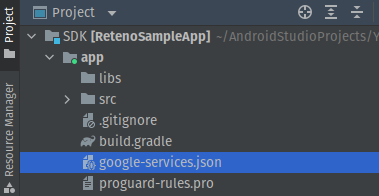
- Download
google-services.jsonfrom Firebase console. - Place it to your Cordova project root or
resources/android/.
- Copy your Firebase key and finish eSputnik panel setup.
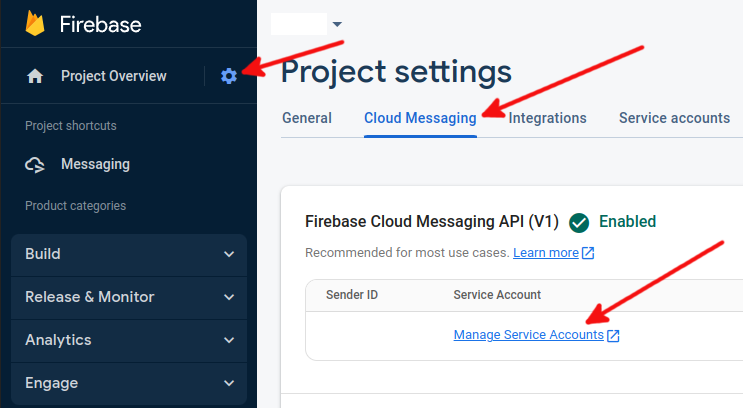
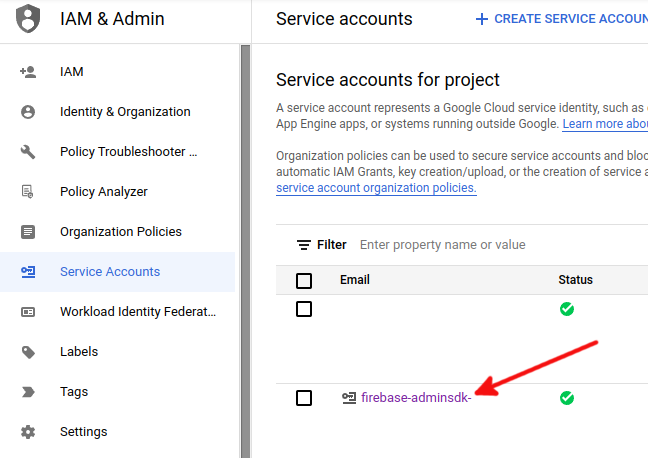
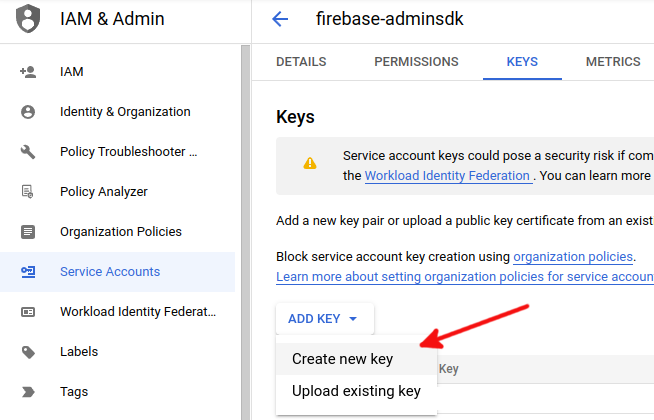
Follow official guides:
Push Notification Listeners
The plugin provides listener-based API for Android push events.
setOnRetenoPushDismissedListener(listener)for dismissed (swiped) pushes.setOnRetenoCustomPushReceivedListener(listener)for custom push payloads.
const onDismissed = (payload) => {
  console.log('Push dismissed', payload);
};

const onCustomReceived = (payload) => {
  console.log('Custom push received', payload);
};

RetenoPlugin.setOnRetenoPushDismissedListener(onDismissed);
RetenoPlugin.setOnRetenoCustomPushReceivedListener(onCustomReceived);

// later:
RetenoPlugin.removeOnRetenoPushDismissedListener(onDismissed);
RetenoPlugin.removeOnRetenoCustomPushReceivedListener(onCustomReceived);
Without Firebasex (Cordova)
If you do not need cordova-plugin-firebasex features, you can still use eSputnik push on Android.
For FCM to work, your Cordova Android project must have:
google-services.jsonfrom Firebase Console.- Google Services Gradle plugin (
com.google.gms.google-services) applied.
How to verify:
platforms/android/app/google-services.jsonexists.platforms/android/app/build.gradlecontainscom.google.gms.google-services.- Build logs do not contain
google-services.json not found.
Warning: Reteno + Firebasex (Android)
If your app also uses cordova-plugin-firebasex, be aware that Firebasex may register its own FirebaseMessagingService.
On Android, only one service receives com.google.firebase.MESSAGING_EVENT, so Firebasex can prevent Reteno callbacks.
Recommendation: do not install Firebasex only for push delivery if Reteno handles push in your app.
Custom FCM Service (optional)
Most Cordova apps do not need a custom FirebaseMessagingService.
If you add one for your own native logic, extend RetenoFirebaseMessagingService (not FirebaseMessagingService) and call super methods.
Official references:
- https://docs.esputnik.com/reference/android-sdk-setup
- https://docs.esputnik.com/reference/android-push-handling
Deeplinks in Push Payloads
eSputnik push notifications can include deeplinks. In Cordova apps, routing to a specific WebView route usually requires an app-level deeplink solution (custom URL scheme, App Links, or a provider such as Branch).
In practice, eSputnik delivers the link in payload, but opening the exact destination screen should be handled by your app deeplink layer.